


Firmware 1.10 introduces more flexible solar and scheduled charging, improved service continuity for managed chargers, support for additional Modbus energy meters, and functionality supporting compliance with UK smart charge point requirements. The release also includes usability, diagnostics, socket-behaviour, and stability improvements.
This document explains what has changed, the value for customers and operators, and the relevant configuration options. Please share it with the appropriate technical, operational, and commercial stakeholders in your organisation.
What’s new in firmware 1.10
The key improvements in this release are:
- Custom Solar strategy: Tailor solar charging by setting start and stop thresholds, a grid power target, and an option to keep charging active. This gives customers more control over self-consumption, grid import, and charging availability.
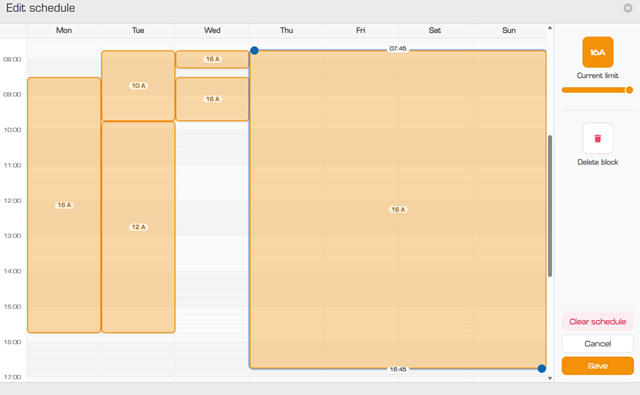
- More precise scheduled charging: Create schedules in 15-minute intervals and set a current limit for each block. This enables closer alignment with dynamic tariffs and more granular energy-management strategies.
- Improved offline behaviour for managed chargers: Managed chargers can now charge before BootNotification acceptance, or time synchronization. Enabling faster commissioning and greater uptime.
- UK smart charging functionality: Adds support for the UK Electric Vehicles (Smart Charge Points) Regulations 2021, including charging schedules, randomised delay, and tamper detection.
- Extended Modbus meter support: Added support for the Inepro N1/Pro1, Inepro N380/P380, and Carlo Gavazzi EM24, giving installers greater flexibility when selecting compatible energy meters.
- Usability and reliability improvements: The charge point ID is now shown on the web-interface login screen. Enhancements to socket behaviour, diagnostics, and overall stability simplify troubleshooting and improve day-to-day operation.
Custom Solar strategy
The new Custom Solar strategy gives customers direct control over how the charger balances available solar energy, grid import, and charging availability. It is intended for installations where the standard solar strategies do not fully match the customer’s operating preference. For example, when a customer wants to maintain a solar surplus export, allow limited grid import, or prioritise uninterrupted charging.
Custom Solar provides the following configurable controls:
- Grid power target: Sets the desired grid import or export level in watts. Positive values permit more grid usage and negative values preserve a larger solar export. For example, -500 W targets an export of 500 W, while 1000 W targets an import of 1000 W.
- Start/stop power threshold: Defines the grid power level, in watts, at which charging will start and stop. For example, a value of -1000 W aims to start charging when the site is consistently exporting 1000 W to the grid and stops again when exporting drops below 1000W.
- Always charge: Keeps the charging session active without configuring a threshold. The charger still adjusts the power automatically, with a minimum of ~1300 W.
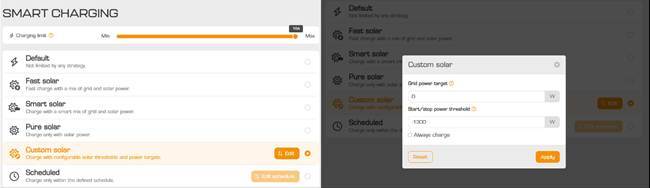
Together, these settings allow installers, end-users, and CPOs to tune charging behaviour to the site’s energy profile and the customer’s preferred balance between solar self-consumption, charging speed, and grid usage.
For CPOs - OCPP configuration keys
|
Key |
Description |
|
SolarChargingMode |
Existing key that defines the solar charging mode. CustomSolar is now available as an accepted value. |
|
SolarChargingCustomerPowerTarget |
Defines the target grid import in watts, or grid export when a negative value is used. |
|
SolarChargingCustomerPowerThreshold |
Defines the grid power threshold, in watts, used to determine whether charging may start or continue in Custom Solar mode. |
|
SolarChargingCustomAlwaysCharge |
When set to true, charging remains active regardless of the configured power threshold. The charger continues to adjust current dynamically. |
More precise scheduled charging
Scheduled charging is now more precise and easier to adapt when energy prices or driver needs change. Schedules can now be configured in 15-minute intervals, with a separate charging current limit for each block. This gives customers more precise control over when and how quickly a vehicle charges, supports closer alignment with dynamic electricity tariffs, and enables operators to build more granular load-management strategies.
Improved offline behaviour for managed chargers
Managed chargers can now be configured to allow charging before the backoffice has accepted the charger’s BootNotification, or before the charger’s clock has been validated or synchronised. This helps operators make a charger available sooner during commissioning and maintain service during selected connectivity or time-synchronisation issues.
Because this behaviour affects authorisation and operational control, charge point operators should select the appropriate policy for their use case and risk controls.
For CPOs - OCPP configuration keys
|
Key |
Description |
|
ChargeBeforeAcceptedPolicy |
Defines whether charging is permitted before the charger’s BootNotification has been accepted by the backoffice. |
|
AllowChargeWithoutValidTime |
Defines whether charging is permitted when the charger does not yet have a valid or synchronised time. |
UK smart charging functionality
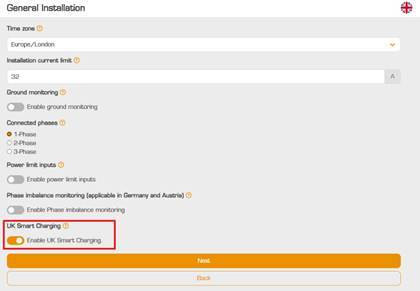
When enabled, this ruleset activates functionality designed to support compliance with the Electric Vehicles (Smart Charge Points) Regulations 2021 for applicable private charge points sold in the UK. It includes default charging schedules, a configurable randomised delay, and tamper-detection functionality.
An override button has also been added to the web interface. When immediate charging is needed, the user can temporarily bypass the randomized delay and start a session.
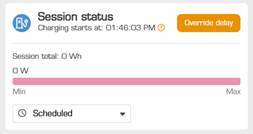
The UK smart charging feature can be enabled during commissioning through the charger’s web interface or, for managed chargers, through the backoffice.
For CPOs - OCPP configuration keys
|
Key |
Description |
|
UkSmartChargingRulesetEnable |
Enables or disables the Great Britain smart charging ruleset. When enabled, the charger applies the associated smart charging behaviours. |
|
RandomisedDelay |
Defines the maximum random delay, in seconds, between a relevant trigger event and the EVSE becoming ready to deliver energy. The supported range is 0–1,800 seconds; the default value is 600 seconds. |
